Most SQL injection attacks succeed not because they are sophisticated, but because nobody was watching the database. GuardDuty RDS Protection changes that equation by putting continuous machine learning directly on your RDS login and query activity.
Why databases are the real prize in a breach
When an attacker compromises a cloud environment, they are rarely satisfied with the compute layer. Servers are replaceable and application code is often public. What they want is the data — the customer records, the financial transactions, the PII that makes a breach worth something. That data lives in your database.
Amazon RDS hosts some of the most sensitive workloads in cloud infrastructure. A misconfigured security group, an overprivileged IAM role, or a single vulnerable query can open a path directly into that data store. And once an attacker has a database connection — even a limited one — they start probing. They look for injection points. They enumerate tables. They exfiltrate row by row, slowly enough to avoid triggering bandwidth alerts.
The traditional response to this threat has been perimeter security: tighten the security group, require TLS, enforce VPC placement. Those controls are necessary but they protect the path to the database, not the database itself. GuardDuty RDS Protection is the first AWS-native control that watches what happens inside that path, after the connection is established.
Why this matters now
According to Verizon's 2025 Data Breach Investigations Report, web application attacks — the category that includes SQL injection — remain the single most common pattern in confirmed data breaches. Database exfiltration is the objective in over 60 percent of those incidents. Perimeter controls alone are not stopping it.
SQL injection — the attack that refuses to die
SQL injection is more than thirty years old as a documented vulnerability class. It was described formally in 1998, it has appeared in the OWASP Top 10 every year since that list began, and it is still responsible for some of the most damaging breaches of the last decade. Understanding why it persists is the first step to understanding why GuardDuty's approach to detecting it is non-trivial.
The mechanics of a basic injection
Consider a login form that constructs a SQL query by concatenating user input directly into a string. The developer's intention is something like this:
-- What the developer intended
SELECT * FROM users
WHERE username = 'alice'
  AND password = 'correct_password';
Now consider what happens when an attacker submits the string ' OR '1'='1 as the username and anything as the password. The concatenated query becomes:
-- What the attacker caused to execute
SELECT * FROM users
WHERE username = '' OR '1'='1'
  AND password = 'anything';

-- '1'='1' is always true, so this returns every row in the users table.
-- Authentication is bypassed entirely.
Beyond authentication bypass
Simple authentication bypass is the entry-level attack. More sophisticated injections use the database engine itself as a tool. A UNION-based injection can extract data from tables the attacker was never meant to see. A blind injection uses timing or conditional responses to infer data one bit at a time, leaving minimal trace in application logs. And a stacked query injection — supported by some database engines — can chain multiple statements in a single call, potentially dropping tables or creating new users.
-- Attacker appends a UNION to pull data from a sensitive table
SELECT id, name FROM products WHERE id = 999
  UNION SELECT username, password FROM admin_users --

-- The -- comments out the rest of the original query.
-- The application returns admin credentials in the product listing.
Why WAFs alone are not enough
Web Application Firewalls inspect HTTP traffic and can block many known injection patterns before they reach your application. But a WAF cannot see queries that originate from within your VPC — from a compromised Lambda function, a misconfigured EC2 instance, or an attacker who has already established a reverse shell. GuardDuty RDS Protection catches what the WAF never even sees.
What GuardDuty RDS Protection actually is
AWS GuardDuty is a regional threat detection service that continuously analyses data sources across your AWS account to find evidence of malicious activity. It launched in 2017 with a focus on CloudTrail management events, VPC Flow Logs, and DNS logs. Over time it has expanded into specialised protection planes. RDS Protection is one of those planes.
GuardDuty RDS Protection, launched in 2023, does two distinct things that are worth separating in your mind because they address different threat classes. First, it analyses RDS login activity — specifically login attempts to Aurora databases — to detect anomalous access patterns using machine learning. Second, in its newer capability, it detects SQL injection attempts by analysing the database activity stream, which is a near-real-time feed of database activity records.
This is meaningfully different from what came before. Prior to GuardDuty RDS Protection, your options for detecting database attacks were either perimeter controls (security groups, VPC, IAM) or application-level logging (CloudTrail API calls, Aurora audit logs). Neither of those surfaces tell you what SQL statements are actually executing inside your database engine. The database activity stream does.
Supported database engines
As of early 2026, GuardDuty RDS Protection covers Aurora MySQL-compatible and Aurora PostgreSQL-compatible clusters. Amazon RDS for MySQL, PostgreSQL, Oracle, SQL Server, and MariaDB are not yet covered by the SQL injection detection specifically, though they benefit from the login anomaly detection component where applicable. This is an important scoping constraint to carry into your architecture decisions.
How the data flows
Attacker
    ↓
Aurora Cluster (MySQL or PostgreSQL)
    ↓
Database Activity Stream (near-real-time feed)
    ↓
GuardDuty ML analysis engine
    ↓
Finding generated → EventBridge · Security Hub · SNS
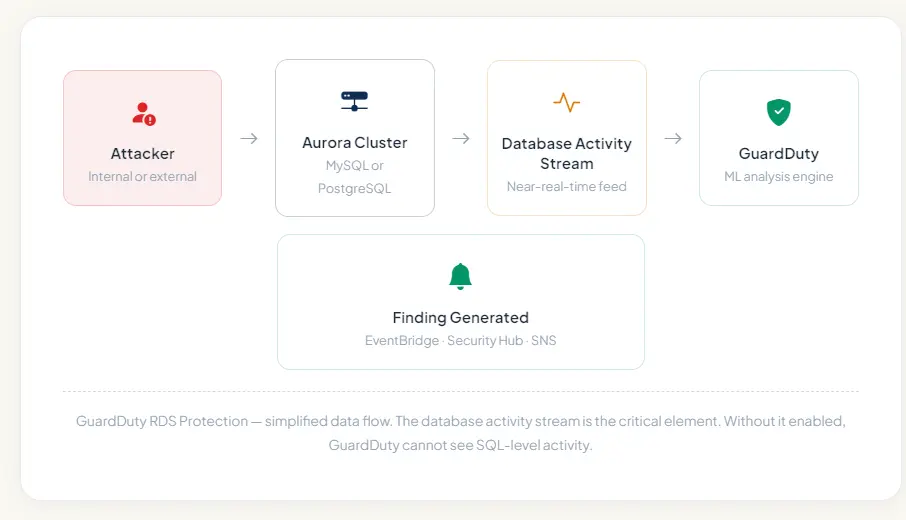
The database activity stream is the critical element. Without it enabled, GuardDuty cannot see SQL-level activity.
How the database activity stream works
The Aurora database activity stream is a separate encrypted Kinesis Data Stream that runs alongside your cluster. Every SQL statement — along with metadata including the user, source IP, timestamp, and database — is serialised and pushed to that stream. GuardDuty consumes this stream directly without requiring you to set up any Kinesis consumers yourself. Enabling GuardDuty RDS Protection automatically provisions this pipeline.
How the detection engine works under the hood
GuardDuty RDS Protection does not work by maintaining a static list of known-bad SQL strings. If it did, every attacker who knows how to use comment characters or encoding tricks would evade it trivially. Instead it approaches the problem from two directions simultaneously.
Behavioural baseline for login anomalies
The login anomaly component builds a behavioural baseline for each RDS instance by observing successful and failed login patterns over time. It learns which IAM identities and which source IPs normally connect to a given database, at what times, from which AWS services, and with what frequency. When a login attempt deviates significantly from that baseline — a previously unseen IP, a user agent that matches a known scanning tool, a sudden spike in failed attempts — GuardDuty raises a finding even if the login attempt uses entirely legitimate credentials.
This matters because credential stuffing and brute force attacks frequently precede SQL injection. An attacker who has obtained valid credentials from a separate breach will try them across cloud databases at scale. GuardDuty catches the pattern before the attacker finds the right credential and establishes a session to begin injecting.
SQL injection pattern recognition via database activity stream
For SQL injection specifically, GuardDuty analyses the database activity stream records, which contain a parsed representation of every SQL statement executed against your Aurora cluster. The analysis applies multiple layers of detection.
At the syntactic layer, it looks for structural anomalies in SQL statements — conditions that are always true, comment characters in unexpected positions, UNION clauses that extend a SELECT in ways inconsistent with legitimate application patterns. At the semantic layer, it looks at the intent of a statement — does this query attempt to access the information schema? Does it reference system tables? Does it combine table names that have never appeared together in legitimate queries against this instance?
Critically, GuardDuty also uses the behavioural context it has built. A query that looks structurally suspicious from a new user who failed authentication six times in the previous hour is treated very differently from an identical structural pattern coming from a trusted application principal during normal business hours. Context is everything in anomaly detection, and the combination of login history with query analysis is what gives GuardDuty RDS Protection its signal quality.
The five finding types you need to know
GuardDuty findings follow a structured naming format: ThreatPurpose:ResourceType/ThreatFamilyName.ThreatType.DetectionMechanism. For RDS Protection, the resource type is RDS and the threat families map to the two detection planes described above.
CredentialAccess:RDS/AnomalousBehavior.SuccessfulLogin — High
A login to your Aurora cluster succeeded from a principal, IP address, or user agent that GuardDuty has not observed in the login history for this instance. This finding fires when the anomaly score crosses a high-confidence threshold — meaning the deviation from baseline is large enough that GuardDuty is confident this is not routine variance. Treat this as a live credential compromise or account takeover until proven otherwise.
CredentialAccess:RDS/AnomalousBehavior.FailedLogin — Medium
A pattern of failed logins from an anomalous principal or source has been detected. This is the early warning signal for brute force and credential stuffing campaigns. The anomalous classification means the source is outside your established baseline — not simply that many failures occurred. This fires on behavioural deviation, not raw count, which significantly reduces false positives compared to threshold-based alerting.
Execution:RDS/PotentialSqlInjection.SuccessfulLogin — High
SQL injection patterns were detected in queries executed against your Aurora instance following a successful login. The combination of injection indicators in the query stream and a prior successful login session makes this a confirmed execution-phase finding. This is the highest-priority RDS finding GuardDuty generates — the attacker has a session and is actively probing your schema.
Execution:RDS/PotentialSqlInjection.FailedLogin — Medium
SQL injection-indicative query patterns were observed from a session that previously had failed login attempts. This is a strong signal that an attacker who succeeded in gaining access (perhaps through a different credential) is using the session to test injection vectors. The correlation with prior failed logins elevates the confidence significantly above a finding based on query analysis alone.
Impact:RDS/UnauthenticatedAccess — Informational
An Aurora instance is publicly accessible and is receiving connection attempts from hosts that have not previously interacted with it. While informational in severity, this is almost always a configuration error rather than intentional design. A publicly accessible Aurora instance without tight security group restrictions is a critical misconfiguration. Treat this as an urgent remediation task regardless of its informational severity classification.
Finding suppression and tuning
If you have legitimate testing or red-team exercises that generate GuardDuty findings, use suppression rules rather than disabling GuardDuty entirely. Suppression rules allow you to filter findings by specific criteria — IP range, IAM principal, resource tag — so your security operations team still sees everything except the known-legitimate noise from controlled activities.
Enabling GuardDuty RDS Protection step by step
Enabling GuardDuty RDS Protection is operationally straightforward but there are prerequisites and choices worth understanding before you click the button.
Step 1 — Enable GuardDuty if you have not already
RDS Protection is a feature plane within GuardDuty, not a standalone service. GuardDuty must be enabled in your account and region before you can activate RDS Protection. If you manage multiple accounts, enable GuardDuty at the AWS Organizations level using a delegated administrator account so all member accounts are covered from a single control point.
Step 2 — Enable database activity streams on your Aurora cluster
Navigate to the RDS console, select your Aurora cluster, and choose Actions → Start database activity stream. Select Asynchronous mode for production clusters (synchronous mode adds latency to every database call). You will be asked to choose a KMS key for encrypting the stream — use a customer-managed key if your security policy requires it. The cluster requires a minor restart for this to take effect.
Step 3 — Enable RDS Protection in the GuardDuty console
In the GuardDuty console, navigate to Settings → Protection plans → RDS Protection and toggle it on. If you are using a delegated administrator, you can push this setting to all member accounts simultaneously. GuardDuty will automatically begin consuming the database activity streams from all enabled Aurora clusters in the account. There is no per-cluster configuration required — once the protection plane is active, every cluster with an activity stream is monitored.
Step 4 — Configure finding routing via EventBridge
GuardDuty emits all findings as EventBridge events. Create an EventBridge rule that matches the RDS finding type prefixes (CredentialAccess:RDS and Execution:RDS) and routes High severity findings to an SNS topic that pages your on-call team. Medium findings can go to a Slack channel or a ticketing system for review within 24 hours. This routing setup is what converts GuardDuty from a log source into an actionable detection control.
Step 5 — Let the ML baseline build
GuardDuty requires approximately two weeks of observation to build a reliable behavioural baseline for login anomaly detection. During this period, false positives on the anomalous login findings may be higher than usual. Do not suppress all findings during this period — review them and use them as a sanity check that your baseline traffic patterns are what you expect them to be. The SQL injection detection is signature-informed and does not require a warm-up period.
AWS CLI — enable RDS Protection
# Get your GuardDuty detector ID first
aws guardduty list-detectors \
  --region ap-south-1

# Enable RDS Protection on the detector
aws guardduty update-detector \
  --detector-id YOUR_DETECTOR_ID \
  --features '[{"Name":"RDS_LOGIN_EVENTS","Status":"ENABLED"}]' \
  --region ap-south-1

# Enable database activity stream on your Aurora cluster
aws rds start-activity-stream \
  --resource-arn arn:aws:rds:ap-south-1:123456789:cluster:my-aurora-cluster \
  --mode async \
  --kms-key-id alias/my-rds-stream-key \
  --apply-immediately

# Verify the stream is active
aws rds describe-db-clusters \
  --db-cluster-identifier my-aurora-cluster \
  --query 'DBClusters[0].ActivityStreamStatus'
What to do when a finding fires
A GuardDuty finding is not an incident — it is evidence that an incident may be in progress. The right response depends on the finding type and severity, and having a documented runbook for each finding type is what separates teams that detect threats from teams that detect and contain them.
For Execution:RDS/PotentialSqlInjection.SuccessfulLogin (High)
This is your most urgent RDS finding. An active session with injection behaviour is in progress. Your first action should be to immediately isolate the session rather than terminate it — check the finding's resource details for the client host and the database user, and use a security group modification to block that specific source IP from reaching the cluster. Terminating the session immediately is less valuable than understanding what queries were executed during it, so preserve the activity stream records before any cleanup.
Pull the database activity stream records for the period from session establishment to now. Identify every table that was referenced in anomalous queries. Assess whether any SELECT statements returned rows containing sensitive data. If the target tables contain PII, financial data, or credentials, you are now in a potential data breach scenario and your incident response and notification obligations begin from that moment.
For CredentialAccess:RDS/AnomalousBehavior.SuccessfulLogin (High)
Before the attacker has begun injecting, you have an opportunity to close the access entirely. Immediately rotate the credentials used in the anomalous login — whether those are database master credentials, IAM-based authentication tokens, or application-specific users. If the login used an IAM role, temporarily detach the rds-db:connect permission while you investigate the source. Validate that the Secrets Manager secret or Parameter Store value storing these credentials has not been accessed by the same principal that triggered the finding.
For CredentialAccess:RDS/AnomalousBehavior.FailedLogin (Medium)
You have time but you should not wait. This is the warning stage. The source is attempting to establish a session and has not yet succeeded. Tighten the security group rule to block the offending IP range, review whether the database endpoint is more broadly accessible than it needs to be, and monitor the activity stream for the next 24 hours for any indication that the attacker pivoted to a different credential or source IP.
Python — Lambda to auto-isolate on High RDS finding
import boto3
import json

def handler(event, context):
    """
    Triggered by EventBridge when GuardDuty emits a High severity
    RDS finding. Automatically blocks the offending source IP by
    modifying the security group associated with the Aurora cluster.
    """
    finding      = event['detail']
    severity     = finding['severity']
    finding_type = finding['type']

    # Only act on High severity RDS findings
    if severity < 7.0 or 'RDS' not in finding_type:
        return

    # Extract the offending IP from the finding detail
    remote_ip = (
        finding['service']['action']
        .get('rdsLoginAttemptAction', {})
        .get('remoteIpDetails', {})
        .get('ipAddressV4')
    )

    if not remote_ip:
        print('No remote IP in finding — skipping auto-isolation')
        return

    # Retrieve the security group ID from the affected resource
    resource = finding['resource']['rdsDbInstanceDetails']
    sg_id    = resource['dbSecurityGroups'][0]['dbSecurityGroupName']

    ec2 = boto3.client('ec2')

    # Revoke the offending IP on port 3306 (MySQL)
    # Use a network ACL in practice — simplified here for clarity
    ec2.revoke_security_group_ingress(
        GroupId=sg_id,
        IpPermissions=[{
            'IpProtocol': 'tcp',
            'FromPort':   3306,
            'ToPort':     3306,
            'IpRanges': [{
                'CidrIp':      f'{remote_ip}/32',
                'Description': 'Auto-blocked by GuardDuty finding'
            }]
        }]
    )

    print(f'Blocked {remote_ip} on security group {sg_id}')
    print(f'Finding type: {finding_type} | Severity: {severity}')
Gaps and limitations — what GuardDuty cannot see
Every security control has a scope boundary, and understanding GuardDuty RDS Protection's boundaries is as important as understanding its capabilities. Building a security posture around a tool without knowing its limits is how gaps get exploited.
| Scenario | GuardDuty covers? | Notes |
| SQL injection via Aurora MySQL or PostgreSQL | ✅ Yes | Requires database activity stream enabled |
| SQL injection via RDS for MySQL or PostgreSQL | ❌ No | Only Aurora clusters supported currently |
| Login anomalies — Aurora clusters | ✅ Yes | Builds ML baseline over ~2 weeks |
| Login anomalies — non-Aurora RDS | ⚠️ Partial | Some finding types apply but SQL detection does not |
| Stored procedure-based injection | ⚠️ Partial | Depends on how the procedure surfaces in activity stream |
| Second-order injection (stored and executed later) | ❌ No | Requires correlation across time and not in scope |
| ORM-layer injection bypassing raw SQL | ❌ No | If the ORM generates valid SQL the intent is invisible |
| Injection via encrypted TLS connection | ✅ Yes | Activity stream operates post-decryption at DB engine layer |
| Slow exfiltration via time-based blind injection | ⚠️ Partial | Individual queries may not trigger but pattern may accumulate |
| Attacks from compromised trusted EC2 or Lambda | ✅ Yes | Behavioural deviation from trusted principal is detectable |
The second-order injection blind spot
Second-order injection is specifically designed to evade detection tools that analyse statements at execution time. The attacker stores malicious SQL data in the database during one request. A later separate request — often from a different user or a background process — retrieves that stored data and incorporates it into a query without sanitisation. GuardDuty sees each individual query in isolation and may not connect the stored payload to its eventual execution. This is a reason to use parameterised queries at the application layer as your primary defence, with GuardDuty as a secondary detection layer rather than a replacement.
Strengthening your posture beyond GuardDuty
GuardDuty RDS Protection is a detection control, not a prevention control. It tells you something bad is happening or has happened — it does not stop the query from executing. A mature database security posture layers prevention, detection, and response controls so that the failure of any single layer does not result in a breach.
Prevention — stop the injection before it reaches the database
Parameterised queries and prepared statements are the single most effective prevention control for SQL injection. When queries are constructed with parameters rather than string concatenation, user input is never interpreted as SQL syntax regardless of what it contains. An ORM framework like SQLAlchemy, Hibernate, or Sequelize uses parameterised queries by default — but it is possible to bypass that protection by using raw query escape hatches. Code review and SAST tooling should specifically flag any use of raw SQL string interpolation.
At the AWS infrastructure layer, RDS Proxy adds a connection pooling layer between your application and Aurora that can enforce connection limits and IAM authentication. Restricting database users to the minimum required permissions — a reporting user that can only SELECT, an application user that has no access to the information schema — limits the blast radius of a successful injection significantly.
Detection — complement GuardDuty with application-layer logging
GuardDuty sees the database activity stream but it does not see your application's request context. Correlating a suspicious database query with the HTTP request that triggered it — including the user session, the endpoint, and the input parameters — is essential for forensic investigation. Structured application logging that includes a request correlation ID, linked to the database query log, gives you that correlation without having to reconstruct it after the fact.
AWS CloudTrail logs all RDS API calls including cluster modifications, snapshot operations, and parameter group changes. An attacker who gains database access may attempt to modify the cluster configuration to disable logging or take a snapshot for exfiltration. CloudTrail-based GuardDuty findings and AWS Config rules over RDS resources catch these post-compromise moves.
Response — automate the first ten minutes
The Lambda-based auto-isolation shown earlier is a starting point. A complete automated response for a High RDS finding should also trigger a Secrets Manager rotation for any credentials associated with the affected database user, send an enriched notification to your security operations channel including the finding details and the affected resource ARN, and create a timestamped snapshot of the Aurora cluster for forensic preservation before any remediation changes are applied. The snapshot step is the one most commonly skipped under pressure and the one most regretted during post-incident review.
Pricing note
GuardDuty RDS Protection pricing is based on the number of database activity stream events processed per month. For most Aurora clusters with typical workloads, the cost is between $3 and $25 per cluster per month. The first 30 days are included in the GuardDuty free trial. Given the cost of a single database breach — remediation, notification, regulatory penalties, and reputational damage — this is one of the most cost-effective security controls available in AWS.
Is your Aurora database protected?
Bithost helps engineering teams enable GuardDuty RDS Protection, configure automated response workflows, and build layered database security across AWS. We also perform database-level penetration testing to validate that your detection controls work before an attacker tests them for you.
Email sales@bithost.in or Visit bithost.in/contactus
We respond within 48 hours
