Most customer support problems are not unique. The same ten questions arrive in different words, from different customers, at all hours of the day.
Somebody asking "where is my order" and somebody asking "can you tell me the status of my delivery" need the same answer. A human reading those two tickets processes them differently. An AI does not care about the phrasing.
This post walks through a complete implementation of an AI-powered customer support layer built on three tools that work together without requiring any custom infrastructure: Odoo handles the CRM and helpdesk, OpenAI provides the language model, and n8n connects everything with automation workflows. The result is a system where routine support tickets are classified, answered, and resolved automatically, while anything complex or emotionally sensitive is routed to a human agent with context already assembled.
The implementation described here is production-ready. Every code block is from a working deployment.
What the system does
Before getting into implementation, it helps to be precise about what "AI customer support automation" actually means in practice, because the term covers a wide range of things.
This system does four things:
One. When a customer submits a support ticket through email or a web form, the system reads the ticket, classifies it into a category, and decides whether it can be handled automatically or needs a human.
Two. For tickets it can handle automatically (order status, return policy questions, account queries, standard FAQs), it generates a response using the customer's actual data from Odoo, sends the reply, and closes or updates the ticket.
Three. For tickets it cannot handle automatically (complaints, refund disputes, technical issues, anything with negative sentiment), it creates a prioritised task in Odoo Helpdesk with a summary, suggested response, and relevant customer history — so the agent picking it up starts at the halfway point, not from scratch.
Four. It learns from agent corrections. When an agent edits an AI-generated draft before sending, the system logs the edit. Over time, this data builds a feedback loop for fine-tuning.
What it deliberately does not do: it does not pretend to be a human. Every automated response includes a footer that identifies it as an AI-generated response with an option to escalate. This is both ethical and practical — customers who know they are interacting with an AI and choose to continue are less likely to escalate than customers who feel deceived.
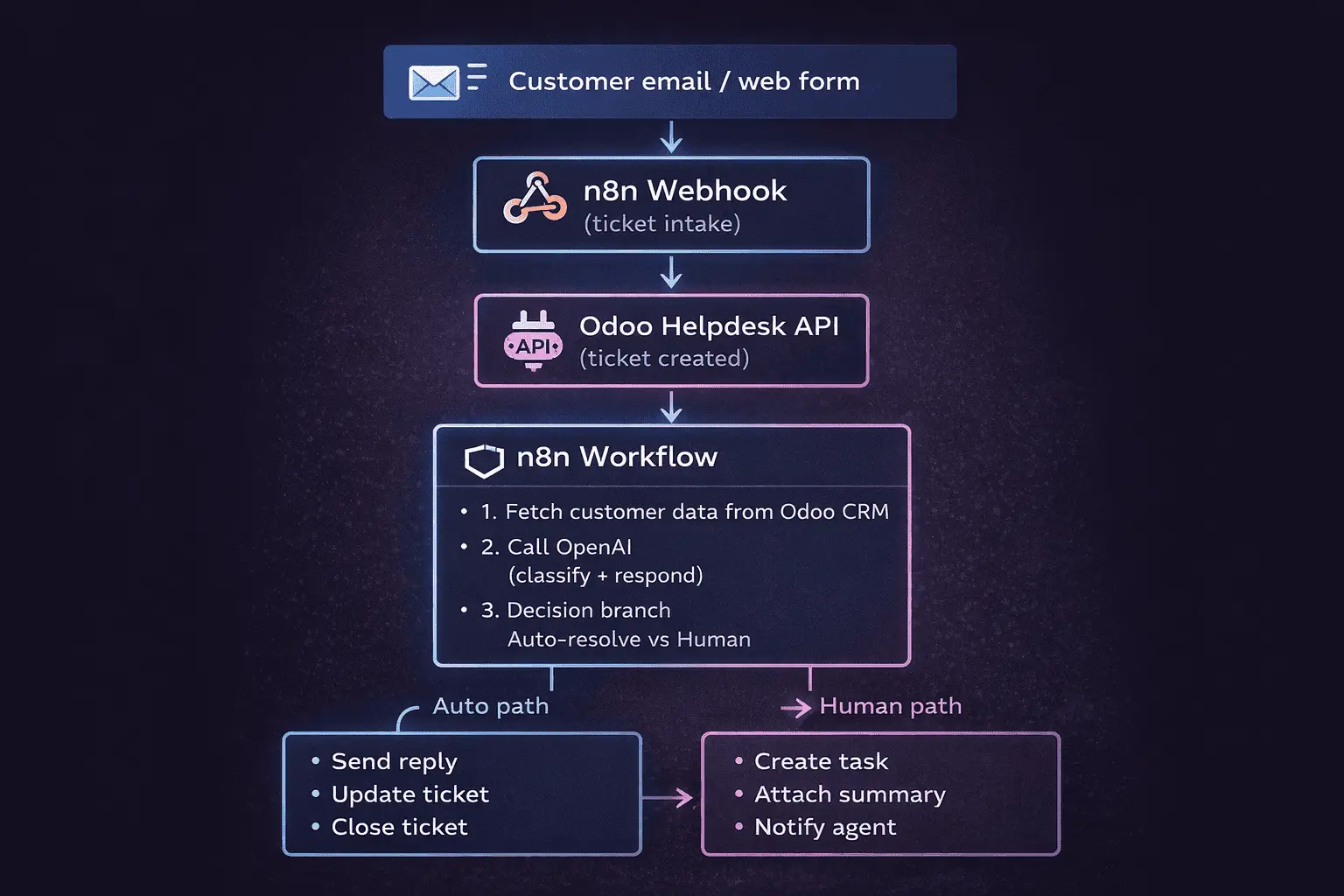
Architecture overview
Customer email / web form
         │
         ▼
    n8n Webhook
    (ticket intake)
         │
         ▼
    Odoo Helpdesk API
    (ticket created)
         │
         ▼
    n8n Workflow
    ┌────────────────────────────┐
    │  1. Fetch customer data    │
    │     from Odoo CRM          │
    │  2. Call OpenAI            │
    │     (classify + respond)   │
    │  3. Decision branch        │
    │     Auto-resolve vs Human  │
    └────────────────────────────┘
         │               │
    Auto path        Human path
         │               │
    Send reply      Create task
    Update ticket   Attach summary
    Close ticket    Notify agent
Prerequisites
- Odoo 17 or 18 (Community or Enterprise) with Helpdesk module
- OpenAI API key (GPT-4o recommended, GPT-4o-mini for cost-sensitive deployments)
- n8n (self-hosted or n8n Cloud)
- Python 3.11+ for the Odoo custom module
- Basic familiarity with Odoo XML-RPC or JSON-RPC API
Step 1: Prepare Odoo
Install the helpdesk ticket intake module
Create a minimal custom Odoo module that adds two fields to helpdesk.ticket:
- ai_classification: what category the AI assigned
- ai_confidence: confidence score from 0 to 1
- ai_handled: boolean — was this ticket resolved by AI
# custom_addons/bh_ai_helpdesk/__manifest__.py

{
    'name': 'BH AI Helpdesk Integration',
    'version': '18.0.1.0.0',
    'depends': ['helpdesk'],
    'data': ['views/helpdesk_ticket_views.xml'],
    'installable': True,
    'author': 'Bithost',
}
# custom_addons/bh_ai_helpdesk/models/helpdesk_ticket.py

from odoo import api, fields, models


class HelpdeskTicket(models.Model):
    _inherit = 'helpdesk.ticket'

    ai_classification = fields.Selection([
        ('order_status',     'Order Status'),
        ('return_policy',    'Return / Refund Policy'),
        ('account_query',    'Account Query'),
        ('billing',          'Billing'),
        ('technical',        'Technical Issue'),
        ('complaint',        'Complaint'),
        ('general_faq',      'General FAQ'),
        ('unclassified',     'Unclassified'),
    ], string='AI Classification', readonly=True)

    ai_confidence   = fields.Float('AI Confidence', digits=(3, 2), readonly=True)
    ai_handled      = fields.Boolean('Handled by AI', default=False, readonly=True)
    ai_draft_reply  = fields.Text('AI Draft Reply', readonly=True)

    def action_escalate_to_human(self):
        """Called when agent takes over an AI-handled ticket."""
        self.write({
            'ai_handled': False,
            'user_id': self.env.uid,
        })
        return True
<!-- views/helpdesk_ticket_views.xml -->
<?xml version="1.0" encoding="utf-8"?>
<odoo>
  <record id="view_helpdesk_ticket_form_ai" model="ir.ui.view">
    <field name="name">helpdesk.ticket.form.ai</field>
    <field name="model">helpdesk.ticket</field>
    <field name="inherit_id" ref="helpdesk.helpdesk_ticket_view_form"/>
    <field name="arch" type="xml">
      <xpath expr="//sheet" position="inside">
        <group string="AI Processing" attrs="{'invisible': [('ai_classification','=',False)]}">
          <field name="ai_classification" readonly="1"/>
          <field name="ai_confidence"     readonly="1" widget="percentage"/>
          <field name="ai_handled"        readonly="1"/>
          <field name="ai_draft_reply"    readonly="1" widget="text"/>
          <button name="action_escalate_to_human"
                  type="object"
                  string="Assign to Me"
                  class="btn-secondary"
                  attrs="{'invisible': [('ai_handled','=',False)]}"/>
        </group>
      </xpath>
    </field>
  </record>
</odoo>
Create an Odoo API user for n8n
In Odoo: Settings → Users → Create
- Name: n8n Integration
- Email: n8n@yourdomain.com
- Set a strong password
- Assign groups: Helpdesk Administrator, CRM User, Sales User (read-only on sales orders)
- Generate an API key: Settings → Technical → API Keys → New
Keep the API key. You will use it in n8n.
Expose the order lookup endpoint
Create a simple controller that n8n can call to fetch order data for a given customer email:
# custom_addons/bh_ai_helpdesk/controllers/main.py

import json
from odoo import http
from odoo.http import request


class AIHelpdeskController(http.Controller):

    @http.route('/api/ai/customer-context',
                type='json',
                auth='api_key',
                methods=['POST'],
                csrf=False)
    def customer_context(self, email: str):
        """
        Returns customer data relevant for AI response generation.
        Called by n8n before passing context to OpenAI.
        """
        Partner = request.env['res.partner'].sudo()
        partner = Partner.search([('email', '=ilike', email)], limit=1)

        if not partner:
            return {'found': False}

        # Last 5 sale orders
        orders = request.env['sale.order'].sudo().search(
            [('partner_id', '=', partner.id)],
            order='date_order desc',
            limit=5,
        )

        # Open helpdesk tickets
        open_tickets = request.env['helpdesk.ticket'].sudo().search([
            ('partner_id', '=', partner.id),
            ('stage_id.fold', '=', False),
        ])

        return {
            'found':       True,
            'customer': {
                'name':    partner.name,
                'email':   partner.email,
                'phone':   partner.phone or '',
                'since':   partner.create_date.strftime('%B %Y') if partner.create_date else '',
            },
            'orders': [{
                'ref':        o.name,
                'date':       o.date_order.strftime('%d %b %Y'),
                'status':     o.state,
                'total':      o.amount_total,
                'currency':   o.currency_id.symbol,
                'lines':      [{'product': l.product_id.name, 'qty': l.product_uom_qty}
                               for l in o.order_line[:5]],
            } for o in orders],
            'open_tickets': len(open_tickets),
        }
Step 2: The OpenAI prompt design
The quality of the entire system depends on this. A vague prompt produces vague output. This prompt is structured to extract a JSON classification and a reply in a single API call.
# prompt_builder.py
# This runs inside the n8n Code node (JavaScript) or as a standalone script.

def build_system_prompt(company_name: str, company_tone: str) -> str:
    return f"""
You are the AI customer support assistant for {company_name}.
Your tone is {company_tone}.

You will receive a support ticket and the customer's account data.
You must respond with a single valid JSON object — no markdown, no preamble.

JSON structure:
{{
  "classification": one of [
    "order_status", "return_policy", "account_query",
    "billing", "technical", "complaint", "general_faq", "unclassified"
  ],
  "confidence": float between 0 and 1,
  "can_auto_resolve": true or false,
  "reason_if_not": "string explaining why human is needed (empty if auto-resolvable)",
  "sentiment": one of ["positive", "neutral", "frustrated", "angry"],
  "reply": "the full customer-facing reply text, or empty string if cannot auto-resolve",
  "internal_note": "one sentence summary for the human agent if not auto-resolving",
  "suggested_subject": "reply email subject line"
}}

Rules for can_auto_resolve:
- Set to false if sentiment is frustrated or angry
- Set to false if classification is complaint or technical
- Set to false if the ticket contains a refund request above your policy threshold
- Set to false if you are not confident (confidence < 0.75)
- Set to true for order_status, return_policy, general_faq, account_query when confidence >= 0.75

Reply writing rules:
- Address the customer by first name only
- Do not make promises about timelines you cannot confirm from the order data
- If order data is present, reference specific order numbers and dates
- Sign off as "{company_name} Support Team"
- Do not mention OpenAI, GPT, or AI in the reply body
- End every auto-reply with this exact footer on a new line:
  "---
  This response was generated automatically. Reply to this email or click here to speak with a team member."
""".strip()


def build_user_message(ticket_subject: str,
                       ticket_body: str,
                       customer_context: dict) -> str:
    ctx = customer_context

    if not ctx.get('found'):
        customer_section = "Customer: not found in system (new or unregistered customer)"
    else:
        c = ctx['customer']
        orders_text = ""
        for o in ctx.get('orders', []):
            items = ', '.join(f"{l['qty']}x {l['product']}" for l in o['lines'])
            orders_text += (
                f"\n  - Order {o['ref']} on {o['date']}: "
                f"{o['currency']}{o['total']} ({o['status']}) — {items}"
            )
        customer_section = f"""Customer: {c['name']} ({c['email']})
Customer since: {c['since']}
Open support tickets: {ctx.get('open_tickets', 0)}
Recent orders:{orders_text if orders_text else ' None found'}"""

    return f"""TICKET SUBJECT: {ticket_subject}

TICKET BODY:
{ticket_body}

CUSTOMER DATA:
{customer_section}
""".strip()
Step 3: Build the n8n workflow
Workflow 1: Ticket intake and AI processing
This is the main workflow. It triggers on a webhook, processes the ticket through OpenAI, and branches into auto-resolve or human escalation.
Import this JSON into n8n (Workflows → Import from JSON):
{
  "name": "AI Customer Support — Ticket Processor",
  "nodes": [
    {
      "name": "Webhook — Ticket Intake",
      "type": "n8n-nodes-base.webhook",
      "parameters": {
        "path": "support-ticket",
        "responseMode": "onReceived",
        "responseData": "firstEntryJson",
        "httpMethod": "POST"
      }
    },
    {
      "name": "Fetch Customer Context",
      "type": "n8n-nodes-base.httpRequest",
      "parameters": {
        "method": "POST",
        "url": "https://your-odoo.com/api/ai/customer-context",
        "authentication": "genericCredentialType",
        "genericAuthType": "httpHeaderAuth",
        "sendHeaders": true,
        "headerParameters": {
          "parameters": [
            { "name": "Content-Type", "value": "application/json" },
            { "name": "Authorization", "value": "Bearer {{ $env.ODOO_API_KEY }}" }
          ]
        },
        "sendBody": true,
        "bodyParameters": {
          "parameters": [
            { "name": "email", "value": "={{ $json.customer_email }}" }
          ]
        }
      }
    },
    {
      "name": "Build OpenAI Prompt",
      "type": "n8n-nodes-base.code",
      "parameters": {
        "language": "javaScript",
        "jsCode": "const ticket = $('Webhook — Ticket Intake').first().json;\nconst context = $('Fetch Customer Context').first().json;\n\nconst systemPrompt = `You are the AI support assistant for Bithost. Your tone is professional and concise.\\n\\nRespond ONLY with valid JSON, no markdown fences.\\n\\nJSON structure:\\n{\\n  \"classification\": \"order_status|return_policy|account_query|billing|technical|complaint|general_faq|unclassified\",\\n  \"confidence\": 0.0,\\n  \"can_auto_resolve\": false,\\n  \"reason_if_not\": \"\",\\n  \"sentiment\": \"positive|neutral|frustrated|angry\",\\n  \"reply\": \"\",\\n  \"internal_note\": \"\",\\n  \"suggested_subject\": \"\"\\n}\\n\\nSet can_auto_resolve false if: sentiment is frustrated/angry, classification is complaint/technical, confidence < 0.75.`;\n\nlet customerSection = '';\nif (!context.found) {\n  customerSection = 'Customer not found in system (new or unregistered).';\n} else {\n  const c = context.customer;\n  let ordersText = '';\n  for (const o of (context.orders || [])) {\n    const items = o.lines.map(l => `${l.qty}x ${l.product}`).join(', ');\n    ordersText += `\\n  - Order ${o.ref} on ${o.date}: ${o.currency}${o.total} (${o.status}) — ${items}`;\n  }\n  customerSection = `Customer: ${c.name} (${c.email})\\nCustomer since: ${c.since}\\nOpen tickets: ${context.open_tickets}\\nRecent orders:${ordersText || ' None'}`;\n}\n\nconst userMessage = `TICKET SUBJECT: ${ticket.subject}\\n\\nTICKET BODY:\\n${ticket.body}\\n\\nCUSTOMER DATA:\\n${customerSection}`;\n\nreturn [{ json: { systemPrompt, userMessage, ticket, context } }];"
      }
    },
    {
      "name": "OpenAI — Classify and Draft",
      "type": "n8n-nodes-base.openAi",
      "parameters": {
        "resource": "chat",
        "operation": "message",
        "modelId": "gpt-4o",
        "messages": {
          "values": [
            {
              "role": "system",
              "content": "={{ $json.systemPrompt }}"
            },
            {
              "role": "user",
              "content": "={{ $json.userMessage }}"
            }
          ]
        },
        "options": {
          "temperature": 0.2,
          "maxTokens": 1024
        }
      }
    },
    {
      "name": "Parse AI Response",
      "type": "n8n-nodes-base.code",
      "parameters": {
        "language": "javaScript",
        "jsCode": "const raw = $('OpenAI — Classify and Draft').first().json.message.content;\nconst prompt = $('Build OpenAI Prompt').first().json;\n\nlet parsed;\ntry {\n  // Strip markdown fences if model added them despite instruction\n  const clean = raw.replace(/```json\\n?/g, '').replace(/```\\n?/g, '').trim();\n  parsed = JSON.parse(clean);\n} catch (e) {\n  // Fallback: cannot parse = escalate to human\n  parsed = {\n    classification: 'unclassified',\n    confidence: 0,\n    can_auto_resolve: false,\n    reason_if_not: 'AI response could not be parsed',\n    sentiment: 'neutral',\n    reply: '',\n    internal_note: 'AI parsing failed. Raw response: ' + raw.substring(0, 200),\n    suggested_subject: 'Re: ' + prompt.ticket.subject\n  };\n}\n\nreturn [{ json: { ...parsed, ticket: prompt.ticket, context: prompt.context } }];"
      }
    },
    {
      "name": "Route: Auto or Human?",
      "type": "n8n-nodes-base.if",
      "parameters": {
        "conditions": {
          "boolean": [
            {
              "value1": "={{ $json.can_auto_resolve }}",
              "value2": true
            }
          ]
        }
      }
    }
  ]
}
Workflow 1 continued — Auto-resolve branch
After the IF node, the true branch runs these steps:
// n8n Code node: "Update Odoo Ticket — Auto Resolved"
// Calls Odoo XML-RPC to update the ticket and post a message

const aiData   = $('Route: Auto or Human?').first().json;
const ticket   = aiData.ticket;
const odooUrl  = $env.ODOO_URL;
const odooDb   = $env.ODOO_DB;
const odooUid  = $env.ODOO_UID;
const odooPass = $env.ODOO_API_KEY;

// Step 1: Find the ticket in Odoo by external reference
const searchResp = await $helpers.httpRequest({
  method: 'POST',
  url:    `${odooUrl}/web/dataset/call_kw`,
  headers: { 'Content-Type': 'application/json' },
  body: JSON.stringify({
    jsonrpc: '2.0',
    method:  'call',
    params: {
      model:  'helpdesk.ticket',
      method: 'search_read',
      args:   [[['name', '=', ticket.odoo_ticket_ref]]],
      kwargs: { fields: ['id', 'name', 'partner_id'], limit: 1 }
    }
  }),
  auth: { user: String(odooUid), password: odooPass }
});

const tickets = JSON.parse(searchResp.body).result;
if (!tickets.length) throw new Error('Ticket not found in Odoo');

const ticketId = tickets[0].id;

// Step 2: Update ticket fields
await $helpers.httpRequest({
  method: 'POST',
  url:    `${odooUrl}/web/dataset/call_kw`,
  headers: { 'Content-Type': 'application/json' },
  body: JSON.stringify({
    jsonrpc: '2.0',
    method:  'call',
    params: {
      model:  'helpdesk.ticket',
      method: 'write',
      args:   [[ticketId], {
        ai_classification: aiData.classification,
        ai_confidence:     aiData.confidence,
        ai_handled:        true,
        ai_draft_reply:    aiData.reply,
      }],
      kwargs: {}
    }
  }),
  auth: { user: String(odooUid), password: odooPass }
});

// Step 3: Post the AI reply as an internal note + send to customer
await $helpers.httpRequest({
  method: 'POST',
  url:    `${odooUrl}/web/dataset/call_kw`,
  headers: { 'Content-Type': 'application/json' },
  body: JSON.stringify({
    jsonrpc: '2.0',
    method:  'call',
    params: {
      model:  'helpdesk.ticket',
      method: 'message_post',
      args:   [ticketId],
      kwargs: {
        body:        aiData.reply,
        message_type: 'email',
        subtype_xmlid: 'mail.mt_comment',
        subject:     aiData.suggested_subject,
      }
    }
  }),
  auth: { user: String(odooUid), password: odooPass }
});

return [{ json: { success: true, ticket_id: ticketId, classification: aiData.classification } }];
Workflow 1 continued — Human escalation branch
// n8n Code node: "Update Odoo Ticket — Escalate to Human"

const aiData   = $('Route: Auto or Human?').first().json;
const ticket   = aiData.ticket;
const odooUrl  = $env.ODOO_URL;
const odooUid  = $env.ODOO_UID;
const odooPass = $env.ODOO_API_KEY;

// Find ticket in Odoo
const searchResp = await $helpers.httpRequest({
  method: 'POST',
  url:    `${odooUrl}/web/dataset/call_kw`,
  headers: { 'Content-Type': 'application/json' },
  body: JSON.stringify({
    jsonrpc: '2.0', method: 'call',
    params: {
      model: 'helpdesk.ticket', method: 'search_read',
      args:  [[['name', '=', ticket.odoo_ticket_ref]]],
      kwargs: { fields: ['id'], limit: 1 }
    }
  }),
  auth: { user: String(odooUid), password: odooPass }
});

const ticketId = JSON.parse(searchResp.body).result[0]?.id;
if (!ticketId) throw new Error('Ticket not found');

// Build the internal note with full context for the agent
const agentBriefing = `
AI CLASSIFICATION: ${aiData.classification} (confidence: ${(aiData.confidence * 100).toFixed(0)}%)
SENTIMENT: ${aiData.sentiment}
REASON FOR ESCALATION: ${aiData.reason_if_not}

SUMMARY FOR AGENT:
${aiData.internal_note}

CUSTOMER HISTORY:
${aiData.context.found ? `
- Customer since: ${aiData.context.customer.since}
- Open tickets: ${aiData.context.open_tickets}
- Recent orders: ${aiData.context.orders?.map(o => `${o.ref} (${o.status})`).join(', ') || 'None'}
` : 'No customer record found in Odoo.'}

SUGGESTED REPLY DRAFT (review before sending):
${aiData.reply || 'No draft generated — requires manual response.'}
`.trim();

// Post as internal note visible to agents only
await $helpers.httpRequest({
  method: 'POST',
  url:    `${odooUrl}/web/dataset/call_kw`,
  headers: { 'Content-Type': 'application/json' },
  body: JSON.stringify({
    jsonrpc: '2.0', method: 'call',
    params: {
      model: 'helpdesk.ticket', method: 'message_post',
      args:  [ticketId],
      kwargs: {
        body:          `<pre>${agentBriefing}</pre>`,
        message_type:  'comment',
        subtype_xmlid: 'mail.mt_note',
      }
    }
  }),
  auth: { user: String(odooUid), password: odooPass }
});

// Set priority and update AI fields
await $helpers.httpRequest({
  method: 'POST',
  url:    `${odooUrl}/web/dataset/call_kw`,
  headers: { 'Content-Type': 'application/json' },
  body: JSON.stringify({
    jsonrpc: '2.0', method: 'call',
    params: {
      model: 'helpdesk.ticket', method: 'write',
      args:  [[ticketId], {
        ai_classification: aiData.classification,
        ai_confidence:     aiData.confidence,
        ai_handled:        false,
        ai_draft_reply:    aiData.reply || '',
        // Set high priority if angry sentiment
        priority: aiData.sentiment === 'angry' ? '3' : '1',
      }],
      kwargs: {}
    }
  }),
  auth: { user: String(odooUid), password: odooPass }
});

return [{ json: { escalated: true, ticket_id: ticketId, priority_set: aiData.sentiment === 'angry' ? 'urgent' : 'normal' } }];
Step 4: The email intake trigger
In production, tickets arrive by email. Configure an n8n Email Trigger (IMAP) node pointing to your support inbox:
Node: Email Trigger (IMAP)
Host: mail.yourdomain.com
Port: 993
User: support@yourdomain.com
Password: [app password]
Mailbox: INBOX
Wire it to a Code node that normalises the email into the structure the webhook expects:
// n8n Code node: "Normalise Email to Ticket Format"

const email  = $json;
const sender = email.from?.value?.[0] || {};

// Strip quoted reply content from email body
function stripQuotedContent(body) {
  if (!body) return '';
  const lines = body.split('\n');
  const cutoff = lines.findIndex(l =>
    l.match(/^On .+ wrote:/) ||
    l.trim().startsWith('>') ||
    l.includes('-----Original Message-----')
  );
  return (cutoff > 0 ? lines.slice(0, cutoff) : lines)
    .join('\n')
    .trim();
}

return [{
  json: {
    customer_email:  sender.address || '',
    customer_name:   sender.name    || sender.address || 'Customer',
    subject:         email.subject  || '(No subject)',
    body:            stripQuotedContent(email.text || email.html?.replace(/<[^>]+>/g, ' ') || ''),
    received_at:     email.date     || new Date().toISOString(),
    message_id:      email.messageId || '',
    odoo_ticket_ref: null,  // will be set after Odoo ticket creation
  }
}];
Step 5: Create the Odoo ticket from the email
Before the AI processing runs, create the ticket in Odoo so it has a reference ID:
// n8n Code node: "Create Odoo Helpdesk Ticket"

const data     = $json;
const odooUrl  = $env.ODOO_URL;
const odooUid  = $env.ODOO_UID;
const odooPass = $env.ODOO_API_KEY;

// Find or create partner
const partnerSearch = await $helpers.httpRequest({
  method: 'POST',
  url:    `${odooUrl}/web/dataset/call_kw`,
  headers: { 'Content-Type': 'application/json' },
  body: JSON.stringify({
    jsonrpc: '2.0', method: 'call',
    params: {
      model: 'res.partner', method: 'search_read',
      args:  [[['email', '=ilike', data.customer_email]]],
      kwargs: { fields: ['id', 'name'], limit: 1 }
    }
  }),
  auth: { user: String(odooUid), password: odooPass }
});

let partnerId = JSON.parse(partnerSearch.body).result[0]?.id || false;

// Create the helpdesk ticket
const createResp = await $helpers.httpRequest({
  method: 'POST',
  url:    `${odooUrl}/web/dataset/call_kw`,
  headers: { 'Content-Type': 'application/json' },
  body: JSON.stringify({
    jsonrpc: '2.0', method: 'call',
    params: {
      model: 'helpdesk.ticket', method: 'create',
      args:  [{
        name:            data.subject,
        description:     data.body,
        partner_id:      partnerId,
        partner_email:   data.customer_email,
        partner_name:    data.customer_name,
        team_id:         parseInt($env.HELPDESK_TEAM_ID),
      }],
      kwargs: {}
    }
  }),
  auth: { user: String(odooUid), password: odooPass }
});

const newTicketId = JSON.parse(createResp.body).result;

// Fetch the generated ticket reference (e.g. HD00042)
const ticketRef = await $helpers.httpRequest({
  method: 'POST',
  url:    `${odooUrl}/web/dataset/call_kw`,
  headers: { 'Content-Type': 'application/json' },
  body: JSON.stringify({
    jsonrpc: '2.0', method: 'call',
    params: {
      model: 'helpdesk.ticket', method: 'read',
      args:  [[newTicketId]],
      kwargs: { fields: ['name'] }
    }
  }),
  auth: { user: String(odooUid), password: odooPass }
});

const ref = JSON.parse(ticketRef.body).result[0]?.name;

return [{ json: { ...data, odoo_ticket_id: newTicketId, odoo_ticket_ref: ref } }];
Step 6: The feedback loop
When an agent edits an AI draft before sending, capture the edit. This data is used for fine-tuning or prompt refinement later.
# In the Odoo custom module, hook into message_post

class HelpdeskTicket(models.Model):
    _inherit = 'helpdesk.ticket'

    # ... (previous fields) ...

    def message_post(self, **kwargs):
        """
        Intercept outbound messages on AI-handled tickets.
        If the sent body differs from the AI draft, log the correction.
        """
        result = super().message_post(**kwargs)

        if (self.ai_handled
                and self.ai_draft_reply
                and kwargs.get('message_type') == 'email'):

            sent_body = kwargs.get('body', '')
            ai_body   = self.ai_draft_reply

            # Strip HTML for comparison
            import re
            def strip_html(text):
                return re.sub(r'<[^>]+>', ' ', text or '').strip()

            sent_clean = strip_html(sent_body)
            ai_clean   = strip_html(ai_body)

            if sent_clean != ai_clean:
                # Log the correction for future fine-tuning
                self.env['bh.ai.feedback'].sudo().create({
                    'ticket_id':   self.id,
                    'category':    self.ai_classification,
                    'ai_response': ai_clean,
                    'human_edit':  sent_clean,
                    'agent_id':    self.env.uid,
                })

        return result
# models/ai_feedback.py

class BhAiFeedback(models.Model):
    _name        = 'bh.ai.feedback'
    _description = 'AI Response Feedback Log'
    _order       = 'create_date desc'

    ticket_id    = fields.Many2one('helpdesk.ticket', 'Ticket', readonly=True)
    category     = fields.Char('Category', readonly=True)
    ai_response  = fields.Text('AI Draft', readonly=True)
    human_edit   = fields.Text('Agent Sent', readonly=True)
    agent_id     = fields.Many2one('res.users', 'Agent', readonly=True)
    reviewed     = fields.Boolean('Reviewed for Training', default=False)
Step 7: n8n environment variables
Set these in n8n's credentials or environment:
ODOO_URL          = https://your-odoo.yourdomain.com
ODOO_DB           = your_database_name
ODOO_UID          = 2                          # the n8n user's ID in Odoo
ODOO_API_KEY      = your_generated_api_key
OPENAI_API_KEY    = sk-...
HELPDESK_TEAM_ID  = 1                          # your helpdesk team ID
SUPPORT_EMAIL     = support@yourdomain.com
What a live ticket looks like
A customer emails: "hi i ordered last week and still havent got anything whats going on"
The system runs within 8 seconds:
Classification:    order_status
Confidence:        0.91
Can auto-resolve:  true
Sentiment:         neutral (mild impatience, not frustrated)

Reply sent to customer:
-----
Hi Sarah,

Thanks for getting in touch.

I can see your order SO-00847 placed on 5 March is currently in transit.
It shipped on 6 March with tracking reference DL9842711.

Based on the shipping estimate, delivery is expected by 14 March.
If it has not arrived by then, please reply to this email and we will
investigate with the courier directly.

Bithost Support Team
---
This response was generated automatically. Reply to this email or click
here to speak with a team member.
-----

Odoo ticket: HD00127 — auto-closed, tagged order_status, ai_handled = true
If the same customer had written: "this is ridiculous i ordered 10 days ago and nobody has responded to my calls i want a full refund and i am telling everyone about this"
Classification:    complaint
Confidence:        0.97
Can auto-resolve:  false
Sentiment:         angry
Reason:            Complaint with refund demand and negative publicity threat

Odoo ticket: HD00128
Priority:    URGENT (auto-set)
Agent note:  "Customer demands refund, order SO-00847. 10 days since order,
             no delivery confirmation. Mentions sharing negative review.
             Customer since Feb 2024, first complaint. Respond within 1 hour."
Draft reply: [provided for agent to review and personalise before sending]
Cost and performance reality
On a deployment handling 400 support tickets per month:
| Item | Monthly cost |
| OpenAI GPT-4o (avg 800 tokens/ticket) | ~$3.00 |
| OpenAI GPT-4o-mini (if you switch) | ~$0.30 |
| n8n Cloud (Starter plan) | $24.00 |
| Odoo Community (self-hosted) | $0 |
| Server hosting (Odoo + n8n) | $20–40 |
Auto-resolution rate on a well-classified ticket base: 55–70% of tickets handled without any human involvement.
For a support team spending 3 hours per day on routine tickets at a blended cost of ₹800/hour, that is ₹1,440/day or ₹43,200/month saved on the tickets the AI handles. The system cost at these volumes is under ₹2,500/month.
What to watch for
Hallucination on order data. The model will fabricate order numbers if the prompt structure is loose. Keep order data in a dedicated, structured section of the user message and explicitly instruct the model to only reference data it has been given.
Sentiment false negatives. GPT-4o occasionally classifies politely-worded frustration as neutral. Add a secondary check: if a ticket contains words like "refund," "cancel," "disappointed," "unacceptable," or "lawyer," override the auto-resolve flag regardless of the model's sentiment classification.
// n8n Code node: "Safety Override Check"
const data = $json;
const body = data.ticket.body.toLowerCase();

const escalationTriggers = [
  'refund', 'cancel', 'cancellation', 'disappointed',
  'unacceptable', 'lawsuit', 'lawyer', 'solicitor',
  'trading standards', 'consumer protection', 'chargeback',
  'fraud', 'scam', 'disgusting', 'horrible'
];

const triggered = escalationTriggers.some(word => body.includes(word));

return [{
  json: {
    ...data,
    can_auto_resolve: triggered ? false : data.can_auto_resolve,
    reason_if_not: triggered
      ? `Safety override: escalation keyword detected (${escalationTriggers.find(w => body.includes(w))})`
      : data.reason_if_not
  }
}];
Token cost with long email threads. Customers who reply within the same thread send the entire conversation history. The stripQuotedContent function handles this but test it against your specific email client formats — Outlook quoted text headers differ from Gmail.
How Bithost can help
We build and deploy this stack for client organisations. The implementation described above is the baseline. What we add on top of it:
Custom classification categories. The eight categories above are generic. A fintech company has different ticket types than a logistics company. We map your actual ticket history to a classification structure that fits your support operation, not a generic template.
Fine-tuning on your data. If the feedback log (the bh.ai.feedback model) accumulates enough corrections — typically 200 to 500 examples — we use it to fine-tune a model on your specific language, your specific products, and your specific resolution patterns. A fine-tuned model on your data consistently outperforms a prompted GPT-4o on generic data.
Odoo Helpdesk dashboards. We build the reporting layer that tells you what percentage of tickets are being auto-resolved, which categories have the lowest AI confidence, which agents are editing AI drafts most frequently, and where your prompt or classification needs refinement.
Multi-channel intake. Email is one channel. WhatsApp Business, live chat, and web forms are others. We extend the same workflow to handle all of them through a unified Odoo helpdesk, with channel-appropriate response formatting.
Ongoing monitoring. AI support systems degrade quietly. A product update changes the most common ticket type. A policy change makes old FAQ answers wrong. A model update by OpenAI changes response style. We provide ongoing monitoring and quarterly reviews to keep the auto-resolution rate stable.
If you are running support on Odoo and the volume of routine tickets is consuming time your team should be spending on complex cases, this is a solvable problem. The stack described above is straightforward to implement for a team that has done it before. The parts that take time are the classification calibration, the safety logic, and the Odoo data model — not the OpenAI integration itself.
Write to sales@bithost.in or visit www.bithost.in to talk through your specific setup.
